
26.10.2026
Air cooling for PCs: how it works and when it fits
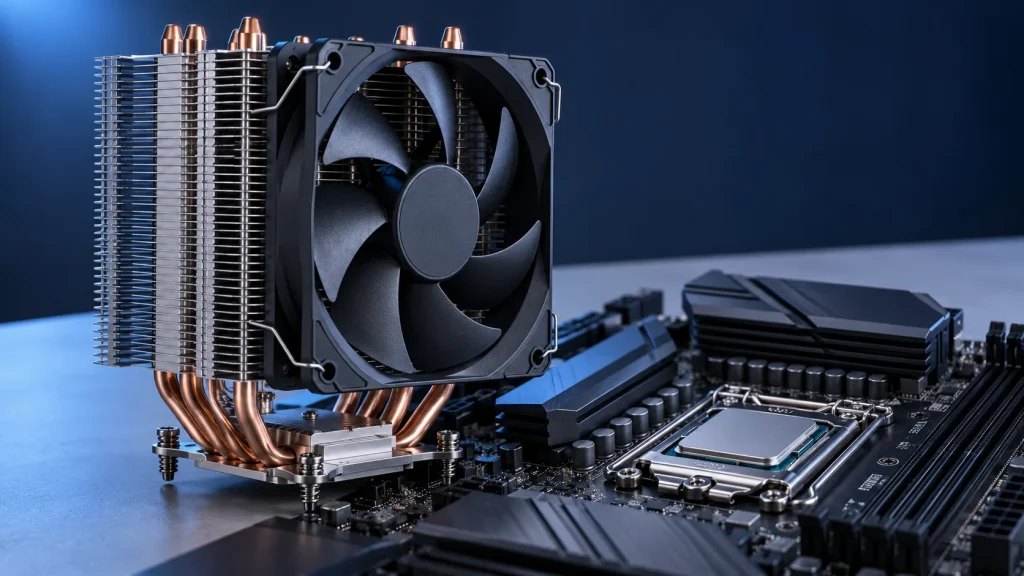
A suitable CPU cooler needs to match the processor, fit the case and meet your noise expectations. Air cooling is worth considering when straightforward installation and routine cleaning are priorities.
How heat leaves the processor
In a typical tower cooler, heat passes through the thermal interface into the base, then through heatpipes to metal fins. The fan moves air through those fins. Case intake and exhaust still matter because the warmed air needs a route out.
Describe the actual workload
Record the exact CPU and whether the PC handles office tasks, gaming or sustained rendering. Fan count and processor family alone are poor selection criteria. Power settings, room temperature and case layout can change the result even with the same CPU.
Check the complete installed dimensions
Verify socket support and the included mounting kit, case height clearance and space around RAM. Raising a front fan over taller memory also increases the total installed height; include that adjustment before ordering.
Plan for everyday use
Look for clear installation instructions and access for cleaning. After assembly, check temperatures and noise with your usual applications before adjusting fan curves. Send Thai Binh the CPU, motherboard, RAM and case model names when requesting compatibility advice.
Technical references: Intel: CPU cooling principles · Noctua: RAM and case clearance.